

An SSH key pair is a combination of a public key file and a private key file. You can think of the public key as a lock on a door and the private key as the key that fits that lock.
By default, SFTP Gateway disables password authentication and uses SSH key pairs as the primary authentication method because they are more secure than passwords.
There are a number of different types of ssh keys. SFTP Gateway will generate a 2048 bit RSA key when generating new key pairs for users.
Public keys
The public key is stored on the server and is used by the OpenSSH sshd service to authenticate the user when they attempt to connect to the server.
The sshd service will check in the /home/username/.ssh/authorized_keys file, which is a list of all public keys that are associated with that user, for the public key that matches the private key provided by the user in the connection. If the public key and private key match, and are associated with the user that is attempting to login, then the user is authenticated and authorized to access the server.
A user’s authorized keys file can have multiple entries of public keys that each pair with there own private key. This allows a user to have multiple private keys that they can use to connect to the server. This also allows for 3rd party programs, infrastructure, or multiple users to connect to the same user account.
Entries in the authorized keys file need to be in the OpenSSH format. The OpenSSH format appears as a single key per line in 3 segments, each separated by a single white space character. Segment 1 is the key type. There are many key types but the most common one and the one that SFTP Gateway generates by default is RSA. Segment 2 is the encoded key. This is a long string of randomized characters. This is what is compared to the private key in the authentication process. Segment 3 is an optional comment. This can be a name, email, or other string that just allows you to easily identify which private key correspondences to that public key. The following, below the line, is an example of what an authorized keys file would look like.
keyType encodedKey comment(optional)------------------------------------------------ssh-rsa AAAAB3NzaC1yc2EAAA... jimsKeyssh-rsa AAAAB3NFv9yCFYVt8M... bobsKeySince SFTP Gateway uses a standard installation of OpenSSH that, comes with Linux, for all of the SSH and SFTP connections, all public keys must in the OpenSSH format as shown above. However, some keys may be generated in other formats such as SSH2 and will need to be converted. Below is an example of an SSH2 format key that comes from Putty keygen, which is used in the Windows environment.
---- BEGIN SSH2 PUBLIC KEY ----Comment: "rsa-key-20180903"AAAAB3NzaC1yc2EAAAABJQAAAQEAwTIdI+GVvOkEtn0yVIYU7GaVRW5FVoBzGuzaoNpbDItBtEGBJdmL6x4hNswRqPjOxrp7+bDNlGV+jsyy8GGQzJ90CuHkdVEAsceNPxjZ6sChd94mc9re46ofrWjMpaIGHPWyBxnYMfXI0hm47LNUDD1C67x6E1aKJs52B6XNiCSQOueo6zA+UlEBeizm8U0HcJ+4Ri49tGmz6gMIdB8PcJmohVVZP4ACI35RfByMNAPlFQDmxGFDIPyROF/VqVkE7g1PB0COL8kuNgoWT5Xh9wxr/bK1Hyh5aYEDOugsWMJoGA46Sz9Oi0fU5lDbG33TTTzXCCrFhzKt8NbOhPL9Bw==---- END SSH2 PUBLIC KEY ----Converting a public key
Since SFTP Gateway does not recognize the SSH2 format the public key will have to be converted to OpenSSH format.
If you are in a Linux/Unix environment, you can convert the key to OpenSSH format by saving the key as a plain text file. Then running the command
ssh-keygen -i -f ssh2.pub > openssh.pub. This will create the file openssh.pub that contains the OpenSSH formatted public key:
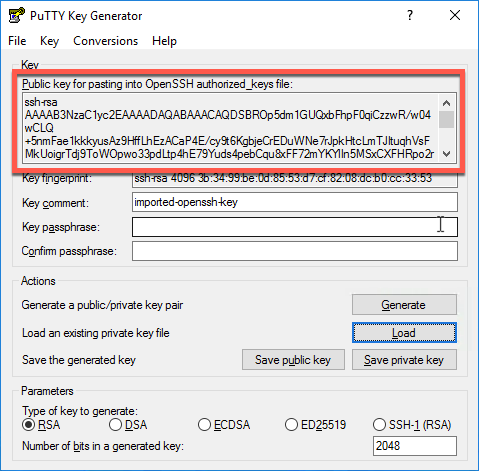
ssh-rsa AAAAB3NzaC1yc2EAAAABJQAAAQEAwTIdI+GVvOkEtn0yVIYU7GaVRW5FVoBzGuzaoNpbDItBtEGBJdmL6x4hNswRqPjOxrp7+bDNlGV+jsyy8GGQzJ90CuHkdVEAsceNPxjZ6sChd94mc9re46ofrWjMpaIGHPWyBxnYMfXI0hm47LNUDD1C67x6E1aKJs52B6XNiCSQOueo6zA+UlEBeizm8U0HcJ+4Ri49tGmz6gMIdB8PcJmohVVZP4ACI35RfByMNAPlFQDmxGFDIPyROF/VqVkE7g1PB0COL8kuNgoWT5Xh9wxr/bK1Hyh5aYEDOugsWMJoGA46Sz9Oi0fU5lDbG33TTTzXCCrFhzKt8NbOhPL9Bw==If you are in a Windows environment and using PuTTY keygen, you can load the key and there will be a box at the top that will have an OpenSSH formatted key for copy and pasting.
Private keys
The private key is housed on the user’s computer. The private key can be further secured by applying an access password to the key, that must be provided before the key can be used in a connection attempt.
The user will provide the private key in the connection to the SFTP Gateway server:
sftp -i path/to/private.key username@server_ip_addressThe private key will look like this. It must contain the line “-----BEGIN RSA PRIVATE KEY-----” at the top, the line “-----END RSA PRIVATE KEY-----” at the bottom, and each line of the encoded key must be 64 characters long. If you open the key in a text editor and it is not formatted like this, it will not be recognized as a valid key.
-----BEGIN RSA PRIVATE KEY-----MIIEowIBAAKCAQEA0VNIYNviug6cL9h8ff6QHtiveGin6cUSWhrF7MRQ9q4+uvf7FMtf0xb3L0fdKO+S9+YkTtvRfyORQR58csnRF9GDEuLkH3cLbCyAwcI71Yxhoz0v06+8pf/9i0lCpTpxil0ubvu5Cne0blfMlxZWXKf6j7Zvmeh19KxJdMDw4XZKnzcI3Zwi+u3ISqAsXztOQHnd5yfy3ItlJUGRUr2pL0pxIwLx/gHKQ1lrBOEhH3WvHGSHGmWOmtSTUdhI8zY6bNxYS6d11BME19YtcfyI97Q30mEW6Poiqj4O6T3MRM6Da85r/0rJ/AJq9NN7AYyCzRJQToXdpX3GZY2Kl0vF/wIDAQABAoIBAHCLOor5LjmiyU7gMm77gzlSf2VZv43sqyVO58OY+X7nyEp2McTIY8j2vAfrt3je9kHatwK/JTAaS2qbnYWKBKWtu69X1hckxjtu4ftLFyiFxakiqKhEAEWwEP3mcbKsbYda+jApnx+FpLj+87z4AY7nscu65t31IhZe20+uvNQ67/GLqogNlk8gsByBQpjSQ1GskAfvOM1T2KUpANoFsR8bvi3+4PpPSI0NB4sSGg7UHUzJBEUZcGFy4z1ClnSZmU1vUP2h2Bl17jNbL3VKkVwTnVs/yGPUIZod65dwt7DSOymhpEVaUBMMhZcvTu+cN98IOa78uFVYMk2kQN/w5oECgYEA+F4PTQsXB9HFMcIPFc6eiA+/4qEvW5STbxKNG+fScI6f0knJQFdDAFjvIQFkZV2GzFmdTvUyjylck5paPjCBwrB0WY6/O7hCCaAFO/dV+XpUeZZ5iektY782CgwrRSpylB8maVmmFXxwUFxhnmx6J5wgfCnDJ8nEPXK+f4PmbS8CgYEA18ISzx76pDVIyxizRUe4f15h6euRL5Y5xT4ykdFIbTj4Sqy5mYWdFgZF/MSsj1hlbOlEdyJ0fbFwD2ii1ed3iqlsvlTY9RB3vKPTmLGXMmqmyYwMBnLg2IExprl4XU1CptJj2RjLSbe2bPxwEtF+/Z6e8OQNjEG5xR7vIzllIDECgYBYRTWy8AoTYV5wPMQXwANf4BkWdqraJYfwpes4y79i+Y2bs1WvZFQPv4vdcx03WXIbFo5uDX8WmmCopOcFyz+S7hur6KvWkboGqbSyh0krDWsQe4ZemVzkYoTWNVT7lAZ81kVUk+QPJtbT+MFJCMyxXy+8cStG7NKt9CX4M+ylSQKBgFQa0BAzKEsYhk69Syynf5EO7qYr8MWXDuAHldjntw70lT0uxY7F2e069s9Ir2eVcrwY1lqGcNiKcX9gL5GokB3aW4x6MLSe/b3oMtSj7ad2kZuhXxKod2OOQReX1wav1lqHSurW0m/jEFa9tMZxKcqdqaGHlIxnFo5zt46IkhYRAoGBAL9ZvfNFSOfOvPcwsPh5wrkGAGt2l0dnxi1s7QfwywtOfO9956IM29TL5QSolYfGA1XUQzf9AtkwXvMQvQpSle/sA4Xmw2VfZ4siMPxuR4CRK1wBnNIwWBQ+FwybZt9Tvrqzk4g8wrAJ6Fxr+HgRifPqc5d9KCfpILtjve2vT2BZ-----END RSA PRIVATE KEY-----